

 July 8, 2026
 How to share access to LinkedIn Ads with us
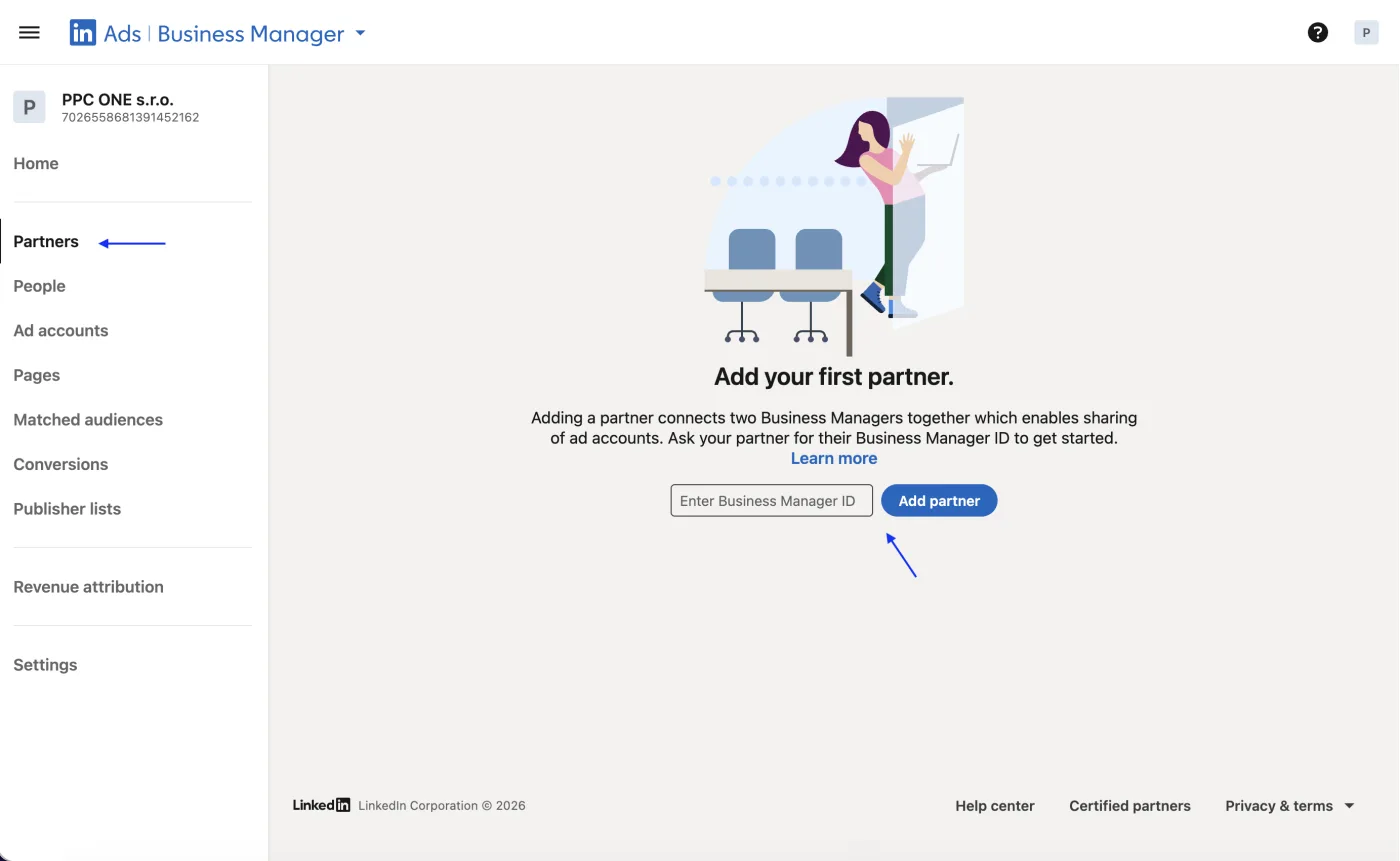
LinkedIn ads are managed in Campaign Manager. You grant us access either by adding us to the ad account or through a partnership in LinkedIn Business Manager. You do not send us a password.
What you will need
- Sign in to Campaign Manager: linkedin.com/campaignmanager
- If you have a Business Manager account, our Business Manager ID: 7026558681391452162
Step by step
- Sign in to Campaign Manager and select the ad account.
- If you manage the account through Business Manager, click Partners in the left menu, create or select a partnership via our Business Manager ID and share the account via Share ad accounts.
- If you do not use Business Manager, open the ad account directly, then open Account settings and Manage access.
- Click Add user.
- Choose the Account Manager role (or Campaign Manager if we should not handle billing and access).
- Assign the role and confirm with Share or Save.
- Write to us so we can verify the access arrived.
Frequently asked questions and issues
- Should I handle access through Business Manager, or directly in Campaign Manager?
-
If the ad account is managed through Business Manager, handle the access there via Partners and Share ad accounts. If you do not use Business Manager, access is added directly in the ad account via Account settings and Manage access.
- Why do you prefer a partnership through Business Manager?
-
With a partnership you add us via our Business Manager ID and share a specific ad account. It is more suitable for agency cooperation, especially when we cannot be easily found as a regular user.
- You cannot be found when adding a user.
-
When adding a user directly, LinkedIn only lets you choose someone who is a 1st, 2nd, or 3rd-degree connection. If you cannot see us, use the Business Manager route and our Business Manager ID.
- Where do I get your Business Manager ID?
-
Our Business Manager ID is 7026558681391452162. Enter this ID in LinkedIn, not an email address.
- Which role should I choose?
-
Choose Account Manager if we should manage the ad account including wider settings. Only choose the Campaign Manager role if we should not handle billing and access.
- I cannot see Manage access.
-
Only a user with the Account Manager role can add access. If you do not have it, ask the ad account admin to grant access.
- I cannot see Partners in Business Manager.
-
You are probably not in the correct Business Manager or you do not have sufficient rights. Check that you opened the business account that actually manages the ad account.
- We have multiple ad accounts.
-
When sharing via Share ad accounts, select all ad accounts we should manage. If you are not sure, send us their names and we will tell you which ones we need.
- How do we verify the access arrived?
-
After confirming via Share or saving, write to us. We will check that we can see the correct ad account and have the correct role set.

CEO & Performance Strategist




 Fast
Fast  Effective
  Nonstop