

 July 8, 2026
 How to share access to Google Merchant Center with us
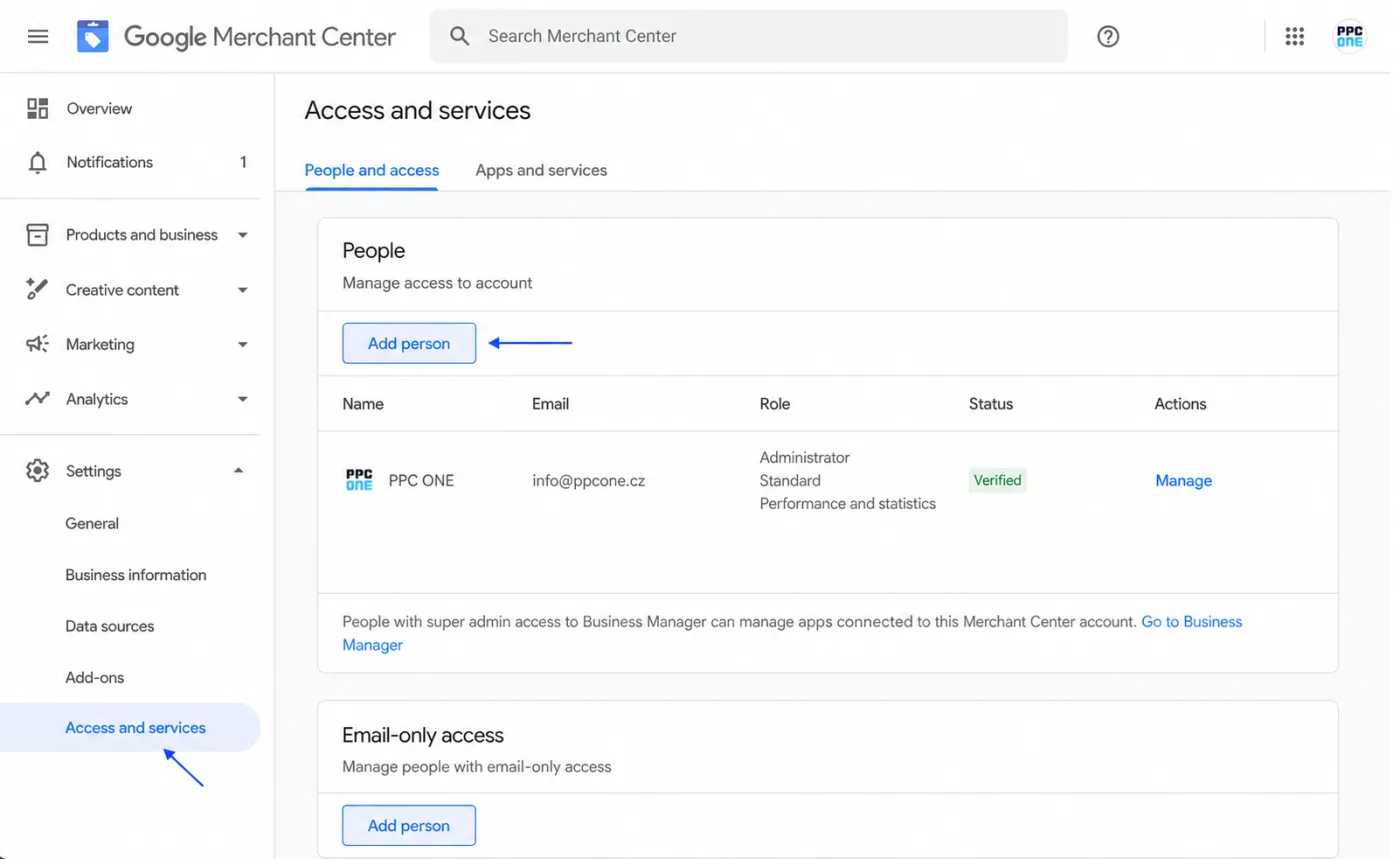
Merchant Center is where you send product data for Shopping ads. To work with it, you just need to invite us by email. This guide applies to the current Merchant Center Next version.
What you will need
- Sign in to Merchant Center: merchants.google.com
- Our email for access: [email protected]
Step by step
- Sign in to Merchant Center.
- In the left menu, click Settings.
- Open Access and services.
- Go to the People and access tab.
- Click Add person and enter [email protected].
- Set the Admin role, or Standard for more limited access.
- Confirm the invitation. The access remains Pending until we accept the invite.
Frequently asked questions and issues
- The guide does not match what I see in Merchant Center.
-
The guide is for the current Merchant Center Next interface. There you will find access under Settings, Access and services and the People and access tab.
- Where exactly do I add a person?
-
In the left menu click Settings, open Access and services, go to People and access and click Add person.
- Which role should we choose?
-
We recommend the Admin role if we should manage Merchant Center fully. Choose the Standard role only if you want to limit access.
- I cannot see Add person.
-
Only users with the Admin role can add people. If you do not have it, ask the Merchant Center admin to add access for [email protected].
- Merchant Center shows an email error.
-
Enter exactly [email protected] without a typo. The address is associated with a Google account, so Merchant Center can add it.
- The access is pending. Is that a problem?
-
No. The pending status means the invite is waiting to be accepted. As soon as we accept it, the access is activated. Write to us that you sent the invite.
- We have multiple Merchant Center accounts.
-
Access needs to be added to every Merchant Center account we should work with. If you are not sure which account is the correct one, send us its name or a screenshot.
- What will you see after sharing?
-
We will see the Merchant Center account and be able to work with the settings that match the chosen role. You do not send us a password and you can remove the access at any time under People and access.
- How do I verify it is done?
-
The address [email protected] should be listed under People and access. After adding it, write to us and we will check that we can see the correct account.

CEO & Performance Strategist






 Fast
Fast  Effective
  Nonstop