
 July 8, 2026
 How to share access to Microsoft Ads (Bing) with us
Microsoft Advertising is the platform for ads on Bing and the Microsoft Search Network. You grant us access by email invitation. You do not send us a password. If you do not have an account yet, we will help you set one up and we can import campaigns from Google Ads.
What you will need
- Sign in to Microsoft Advertising: ads.microsoft.com
- Our email for access: [email protected]
Step by step
- Sign in to Microsoft Advertising.
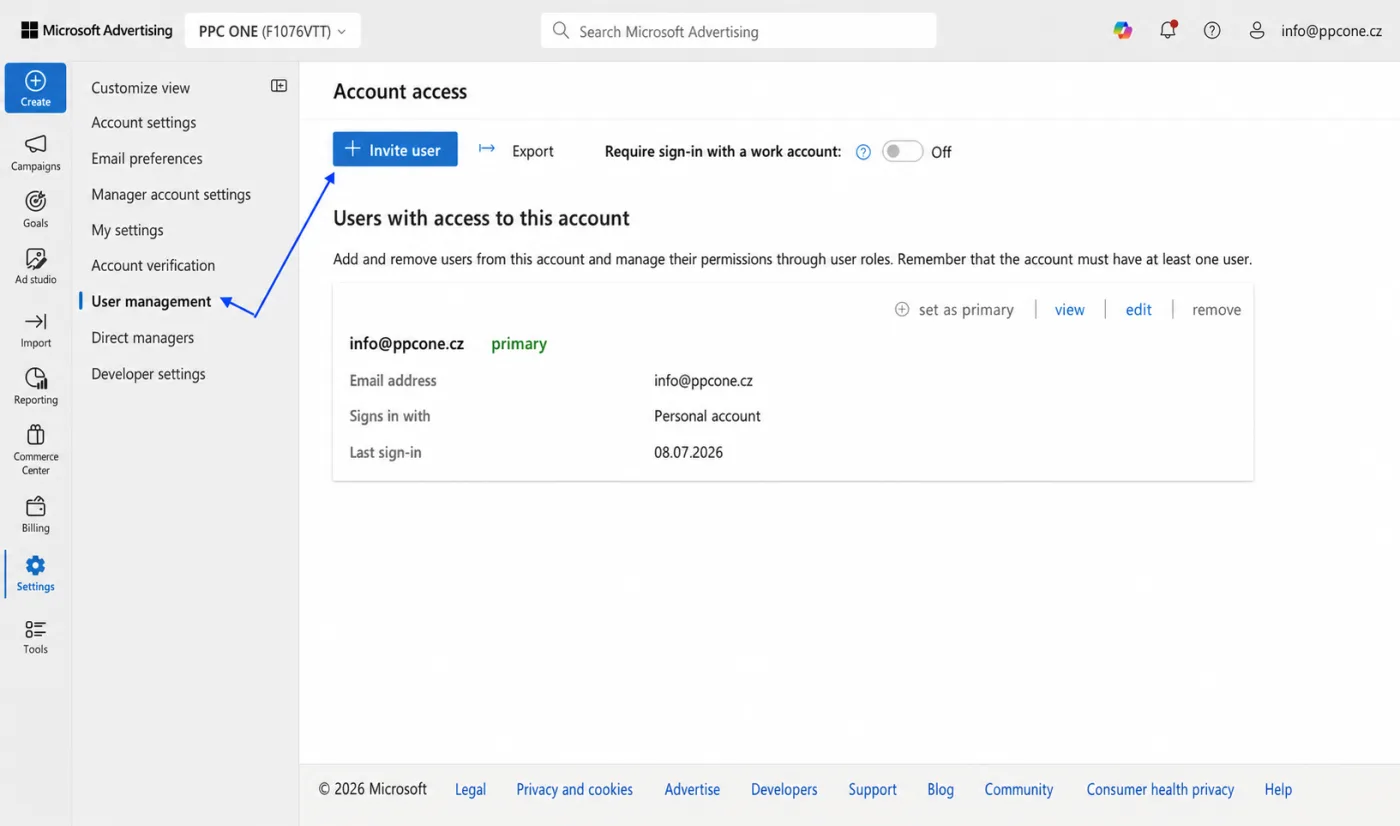
- In the left menu hover over Settings.
- Choose User management.
- Click Invite user.
- Enter a name and the email [email protected].
- Choose the Standard User role (or Super Admin if we should also manage users) and the accounts the access applies to.
- Send the invite. We accept it from the email, it is valid for 30 days.
Frequently asked questions and issues
- I don't have a Microsoft Advertising account yet. What now?
-
Until an account exists, there is nothing to share. Write to us and we will arrange the Microsoft Advertising setup and, if needed, import campaigns from Google Ads together.
- Where do I find Invite user?
-
After signing in to Microsoft Advertising, hover over Settings in the left menu, open User management and click Invite user.
- Which role should we choose?
-
In most cases choose Standard User. Only choose the Super Admin role if we should also manage users and wider account settings.
- I cannot see Invite user.
-
Only users with the Super Admin or Standard User role can invite users. If you do not see this option, ask the account admin to send the invite to [email protected].
- The invite expired.
-
The invite is valid for 30 days. If we did not accept it in time, please send a new invite to [email protected].
- The invite did not arrive.
-
Check that you entered exactly [email protected] and selected the correct accounts the access applies to. Then write to us and we will verify whether we can see it on our side.
- We have multiple accounts in Microsoft Advertising.
-
When sending the invite, select all accounts the access should apply to. If you select only one, the access will not work for the other accounts.
- Was the invite accepted under the wrong account?
-
Let us know which account we should manage. If needed, send a new invite with the correct accounts selected.
- Am I sharing my password or ownership with you?
-
No. You only send an email invitation in Microsoft Advertising. You do not send us a password and you can remove the access later under User management.

CEO & Performance Strategist


 Fast
Fast  Effective
  Nonstop