

 July 8, 2026
 How to share access to Microsoft Clarity with us
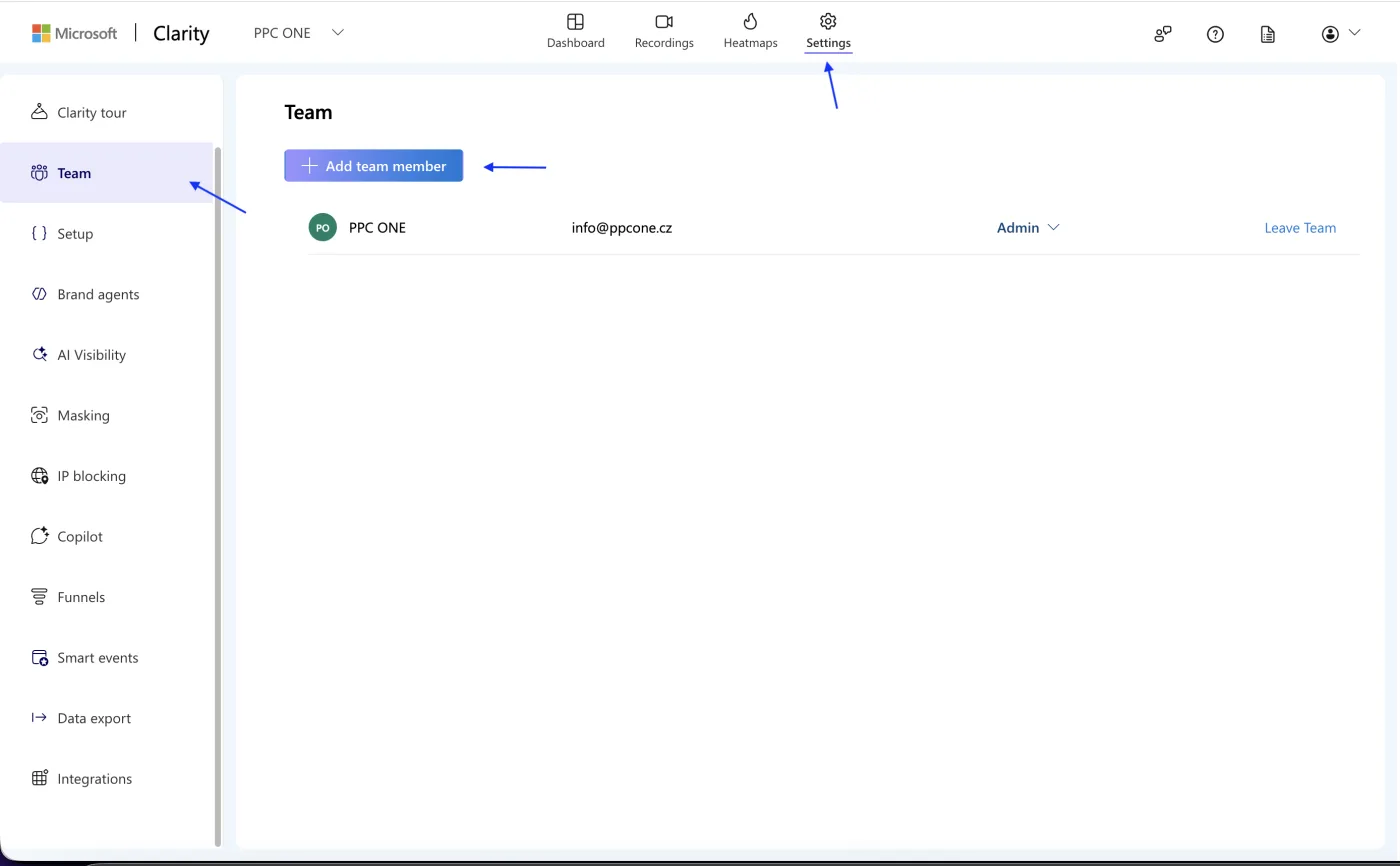
Microsoft Clarity shows session recordings and heatmaps, which let us see how people behave on the site. You grant us access by sending an email invitation to the project.
What you will need
- Sign in to Clarity: clarity.microsoft.com
- Our email for access: [email protected]
Step by step
- Sign in to Microsoft Clarity and open the correct project.
- Go to Settings.
- Open the Team tab.
- Click Add team member.
- Enter the email [email protected].
- Choose the Member role, or Admin if we should also manage settings and the team.
- Send the invite. We will confirm it from the email.
Frequently asked questions and issues
- Is the whole account shared, or just the project?
-
In Microsoft Clarity access is added to a specific project. Open the correct project first, then go to Settings and the Team tab.
- Where do I find Add team member?
-
Open the correct project in Microsoft Clarity, go to Settings, open the Team tab and click Add team member.
- Which role should we choose?
-
To read recordings and heatmaps, the Member role is enough. Only choose the Admin role if we should also manage the project settings or the team.
- I cannot see Add team member.
-
Only a project Admin can add members. If you are not an Admin, ask the project admin to add access for [email protected].
- The invite did not arrive.
-
Check that you entered exactly [email protected]. Then write to us and we will verify whether we can see the invite and confirm it.
- We have multiple projects in Clarity.
-
Access needs to be added to every project we should evaluate. If you share only one project with us, we will not see the other projects.
- I don't have Clarity set up on the site.
-
That is not a problem. Write to us and we will arrange the setup or check the connection with the site.
- What will you see in Clarity?
-
We will see the project's data according to the role you set, mainly session recordings and heatmaps. You do not send us a password and you can remove the access at any time under Team.
- How do I know the access works?
-
After sending the invite, the address [email protected] should be visible in the project team. Write to us and we will check that we can access the correct project.

CEO & Performance Strategist






 Fast
Fast  Effective
  Nonstop