
 July 8, 2026
 How to share access to TikTok Ads with us
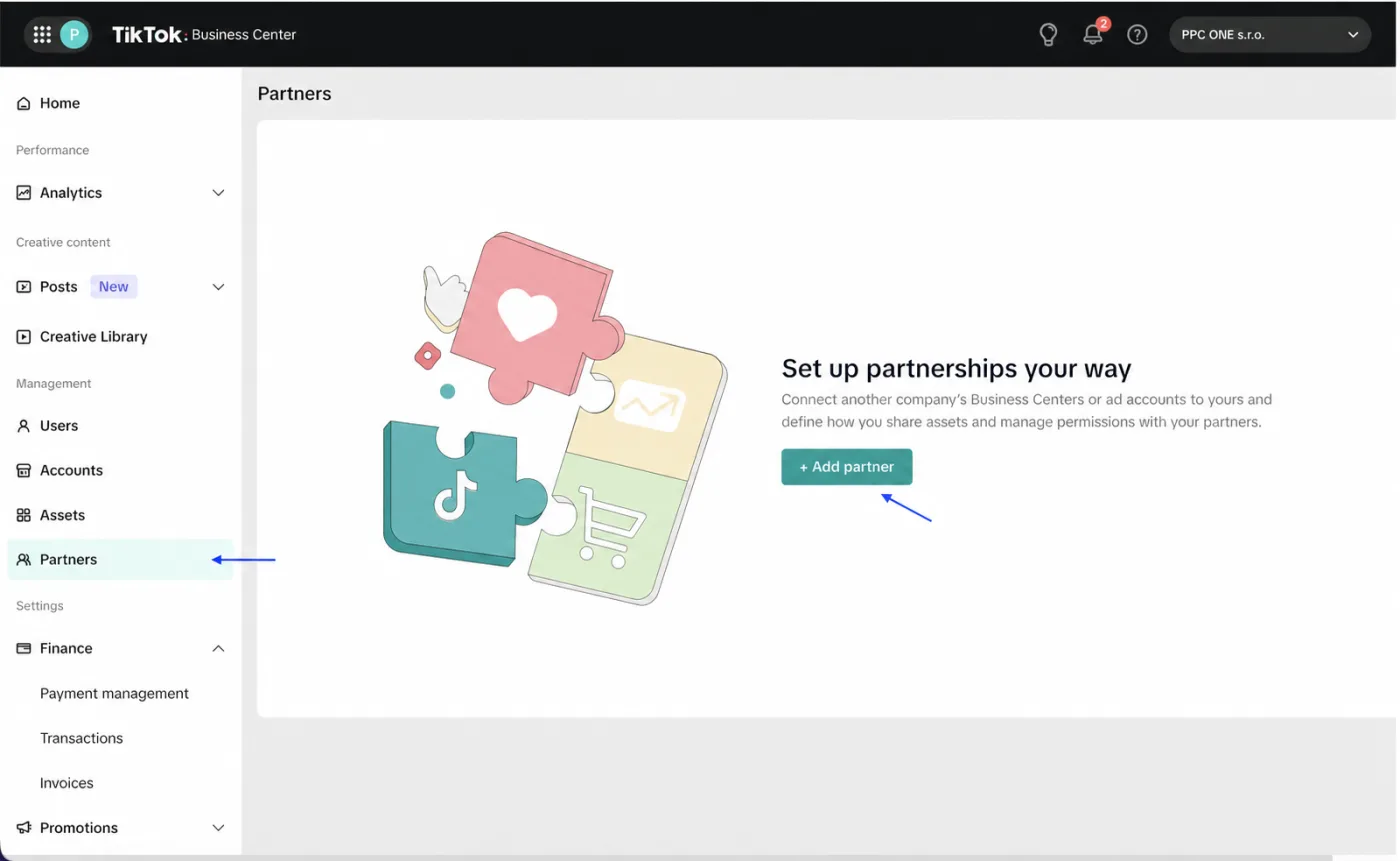
TikTok ads are managed through TikTok Business Center. You grant us access by adding us as a partner via our Business Center ID. You do not send us a password.
What you will need
- Sign in to Business Center: business.tiktok.com
- Our TikTok Business Center ID: 7245213221521604609
Step by step
- Sign in to TikTok Business Center.
- In the left menu click Partners.
- Click Add partner or Add partners, depending on the interface.
- Enter our Business Center ID (or an ad account ID).
- Continue.
- Select the ad account and other assets we should manage, and set the access level to Operator or Admin.
- Confirm the changes to finish sharing access.
Frequently asked questions and issues
- Why don't I add you by email?
-
For agency cooperation, TikTok Ads are shared through TikTok Business Center. You add us as a partner via our Business Center ID, not by email, and you do not send us a password.
- Where do I find Add partner?
-
In TikTok Business Center click Partners in the left menu and then Add partner.
- It wants an ID. Which one should I use?
-
Use our Business Center ID: 7245213221521604609. If you are not sure, write to us. Do not enter a personal account instead of the Business Center ID.
- I cannot see Partners or Add partner.
-
Only a member with the Admin role in Business Center can add a partner. If you do not have this role, ask the Business Center admin to do the sharing.
- Which level should we get?
-
Depending on the scope of cooperation, set Operator or Admin. If we are to manage the account fully, it is best to set the permissions so we can work without further manual steps on your side.
- Which assets should I select?
-
Select the ad account and other assets we should manage. If you have multiple accounts or assets, share only those related to our cooperation.
- I don't have a Business Center.
-
For correct ad sharing you need a Business Center, a standalone ad account is not enough. Write to us and we will arrange setting it up or checking the configuration.
- I entered an ad account ID instead of the Business Center ID.
-
If TikTok does not allow you to add us, or if the sharing request does not arrive correctly, go back a step and enter our Business Center ID. If you are not sure, send us a screenshot without sensitive data.
- How do we verify the sharing works?
-
After you finish sharing access, write to us. We will check that we can see the correct ad account, the selected assets and the permission level set.

CEO & Performance Strategist


 Fast
Fast  Effective
  Nonstop