
 July 8, 2026
 How to share access to Meta Ads (Facebook and Instagram) with us
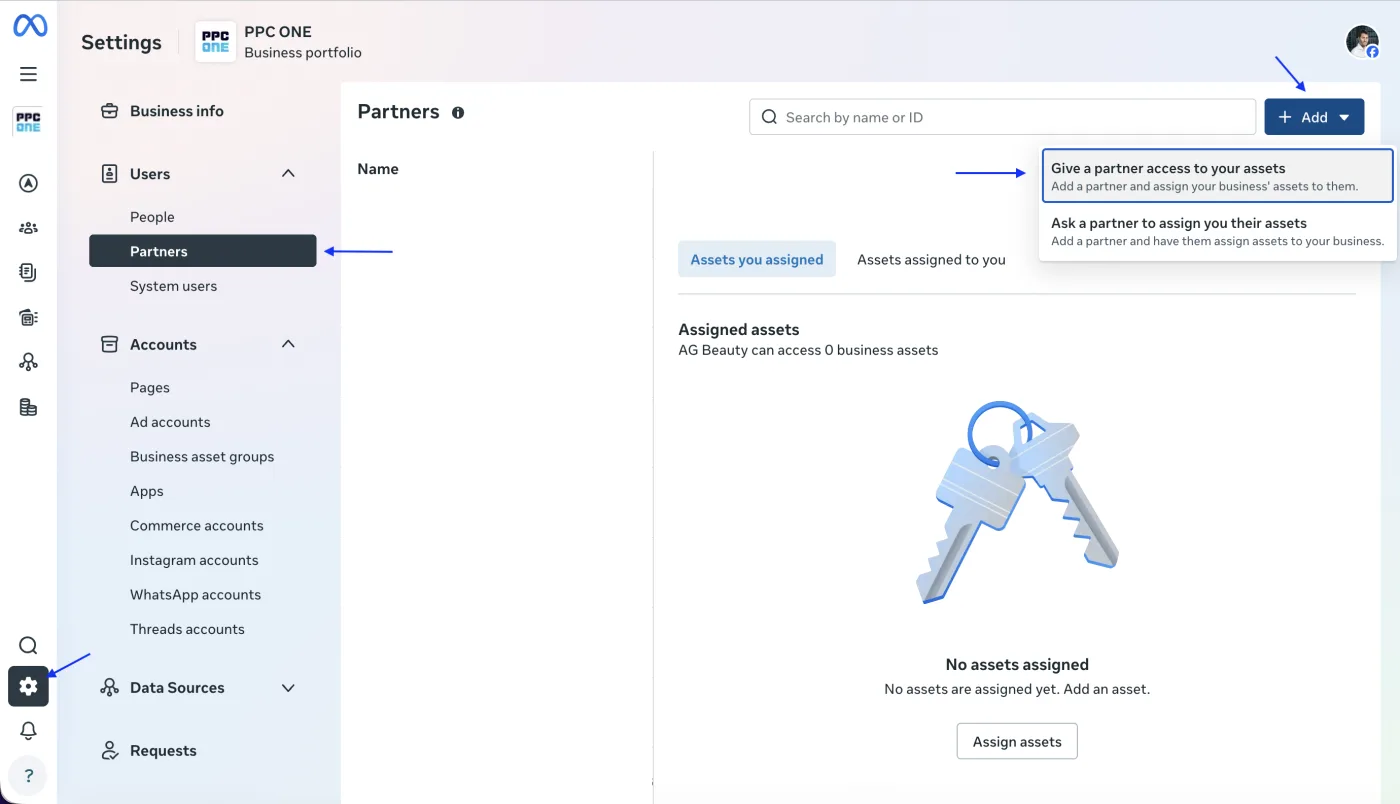
You grant us access to your ads on Facebook and Instagram through a partnership in Meta Business. You do not send us a password or grant access to your personal profile. You only add our agency as a partner to your business assets.
What you will need
- Sign in to Meta Business: business.facebook.com
- Our Business portfolio ID: 815742501807580 (you add us by number, not by email)
- You must have Full control in your business portfolio
Step by step
- Sign in to Meta Business and open Business settings (gear icon) for the correct portfolio.
- In the left menu, under Users, click Partners.
- Click Add and choose Give a partner access to your assets.
- Enter our Business portfolio ID: 815742501807580 and continue.
- Select the assets we should manage: mainly the ad account, then the Page, Instagram account, Meta Pixel, and possibly the catalog.
- For the ad account, set full management, Admin or Full control depending on the interface, and set the level needed to manage ads for the other assets. Confirm the sharing.
- Let us know that it is shared and we will verify that everything is correct.
Frequently asked questions and issues
- Why don't I add you by email?
-
With Meta Ads, agency access is handled through a partnership in Meta Business. You add our Business portfolio ID, not an email address, and you do not send us a password or access to a personal profile.
- Where do I find Partners?
-
In Meta Business open Business settings for the correct portfolio. In the left menu, under Users, click Partners.
- It asks for a Business portfolio ID and I don't have it.
-
Our Business portfolio ID is 815742501807580. Enter this number in Meta Business, not our email address.
- I cannot see the Partners section or the Add option.
-
You must have a full-control role in your business portfolio. If you do not, ask a colleague or supplier who manages the portfolio to set up the partnership.
- Which assets should I share with you?
-
At a minimum the ad account. Depending on our cooperation, also share the Page, Instagram account, Meta Pixel, and possibly the catalog. Without the relevant assets, ads may not be managed or measured correctly.
- What permission level should I set?
-
For the ad account set full management, that is Admin, in the newer interface Full control. For the other assets set the level needed to manage ads.
- I have multiple ad accounts, Pages or pixels.
-
Share only the assets related to the ads we should manage. If you are not sure, send us the account and asset names and we will check the correct selection.
- I don't have a Business Manager or business portfolio.
-
Sharing with a partner works through Meta business portfolios. If you do not have one yet, let us know and we will agree on the next steps.
- How do I remove the access later?
-
In Business settings you will find our partnership under Partners and you can remove either the whole partnership or individual shared assets. This does not share your password or personal profile in any way.
- How do we know the sharing works?
-
After you confirm the sharing, let us know. We will verify that we can see the ad account, the Page, Instagram, the pixel and possibly the catalog at the correct scope.

CEO & Performance Strategist



 Fast
Fast  Effective
  Nonstop