
 July 8, 2026
 How to share access to Sklik with us
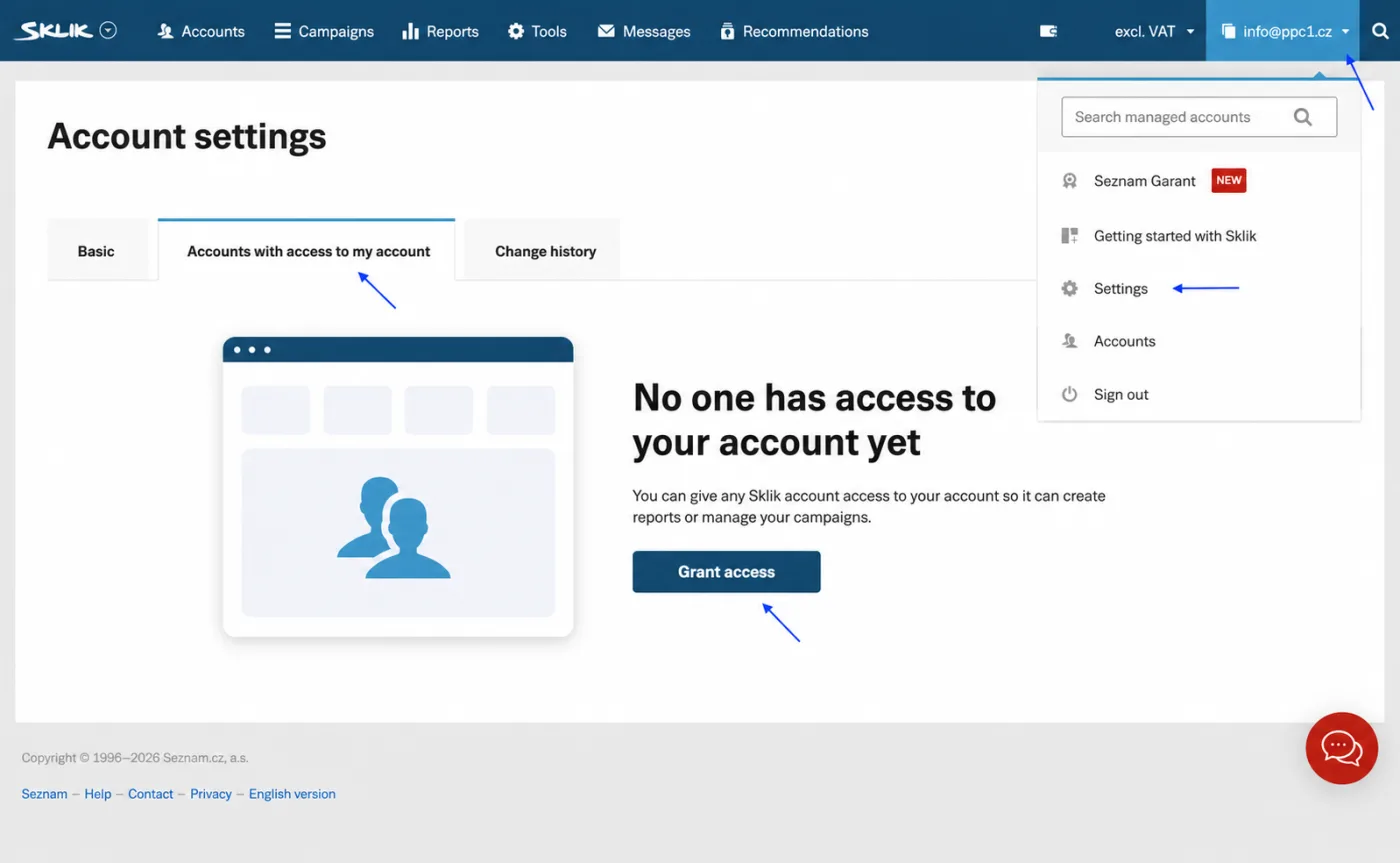
Sklik is advertising in the Seznam search engine. You grant us access directly in the account. You do not send us a password. Note: grant Sklik access to our Seznam email [email protected] (not [email protected]).
What you will need
- Sign in to Sklik: sklik.cz
- Our email for access: [email protected]
Step by step
- Sign in to Sklik with your Seznam account.
- In the top right click your account and choose Settings. Switch to the Accounts with access to my account tab.
- Click the Offer access button.
- Enter our account [email protected].
- Choose the Account administrator role (we can then add specific specialists to your campaigns).
- Send the access request.
- We accept the offer and it is done.
Frequently asked questions and issues
- Which email should I share Sklik with?
-
Grant Sklik access to the Seznam account [email protected]. Do not use the address [email protected] for Sklik access.
- Where do I find Offer access?
-
In Sklik click your account in the top right, choose Settings and switch to the Accounts with access to my account tab. There click Offer access.
- Why choose the Account administrator role?
-
The Account administrator role lets us add specific specialists to your campaigns. The lower Campaign manager role cannot add further access, so we would have to ask you with every change in the team.
- It shows an email error.
-
Check that you enter exactly [email protected], in full and without a typo. This account is registered in Sklik.
- It asks for Wallet registration or acceptance of the terms.
-
The account must be registered in Wallet and the Sklik business terms must be accepted. Without that the access offer may not go through.
- I don't have sufficient rights in Sklik.
-
The access must be offered by a person with the appropriate permissions for the account. If you do not see the options in the guide, ask the owner or admin of the Seznam account.
- You have not accepted the offer, or nothing happened.
-
After sending, write to us. We will check whether the offer arrived at [email protected] and accept it.
- We have multiple Sklik accounts.
-
Offer access from every Sklik account we should manage. If you have multiple accounts under different Seznam logins, you will need to share in each of them.
- Am I sharing my password with you?
-
No. In Sklik you only offer access to the account [email protected]. You do not send us a password and you can remove the access later in the account settings.

CEO & Performance Strategist






 Fast
Fast  Effective
  Nonstop